Skip to content
Logo

Gestion de fichier

Posted on: 23 mai 2022 /
Categories: Système

Cet article est la suite de l’article Client Java JWT

Dans cet article nous allons voir comment modifier notre précédente application Java et y ajouter la gestion de fichier via l’API.

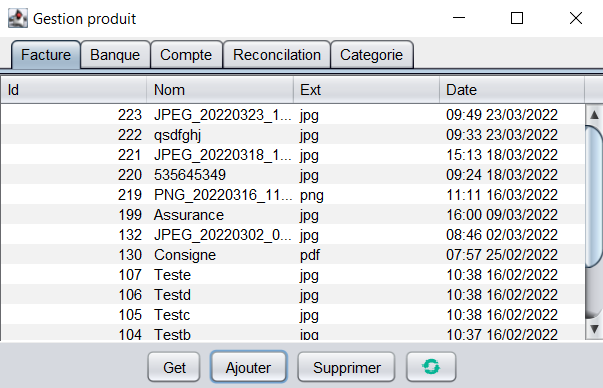
Nous allons premièrement implémenter plusieurs objets correspondant aux différentes fenêtres « Facture« , « Banque« , « Compte« , « Réconciliation » et « Catégorie« .

Pour chaque table, on va créer une classe nomClassePane qui contiendra :

-une fonction initialize() créant une JTable pouvant afficher les données selon le « modèle » de l’objet nomClasseModel (grâce à la fonction setModel()). Mais qu’est ce qu’un modèle ? C’est ici, la source des données pour cette vue. On verra après comment implémenter ce modèle.

-une fonction refresh() qui récupère les nouvelles données de la table concernée à l’aide d’un GET, puis actualise graphiquement la JTable.

-les getters des champs de la classe.

Deuxièmement, pour implémenter un objet nomClasseModel, il faut une classe qui « extends » TableModel. Or, il existe 2 classes qui implémentent l’interface TableModel : DefaultTableModel et AbstractTableModel. Contrairement à la méthode « Default » qui manipule les données avec une structure vector, « Abstract » donne la possibilité de stocker les données librement. Toutefois, on devra implémenter les méthodes qui permettent d’interagir avec une JTable.

Pour pouvoir au minimum lire les données et les afficher sur la table, 3 méthodes doivent être overridées :

  • public int getRowCount(): renvoie le nombre de lignes.
  • public int getColumnCount(): renvoie le nombre de colonnes.
  • public Object getValueAt(int ligne, int colonne): retourne l’objet dans la case (ligne, colonne).

Par la suite, d’autres getters et setters sont overridées pour supprimer ou modifier la table en question. Cela est fait en manipulant une ArrayList du type de l’objet concerné, typographié ObjNomObjet (exemple : ObjBank pour BankTableModel).

La fonction addLine() permet l’envoi d’une nouvelle ligne sur la table au serveur, la fonction parse() est appelée lorsqu’un GET est effectué (notifié par le PropertyChange). Lorsqu’un POST est effectué, un élément est ajouté à l’ArrayList.

Voici un exemple complet avec la section « Banque » de l’application :

BankPane :

public class BankPane{
private JTable table = null;
private BankTableModel bankTableModel = null;
private JScrollPane scrollPane = null;

public BankPane(){
    super();
    initialize();
}

private void initialize() {
    table = new JTable();
    bankTableModel = new BankTableModel();
    table.setModel(bankTableModel);
    table.setAutoCreateRowSorter(true);
    table.setSelectionMode(ListSelectionModel.SINGLE_SELECTION);
    scrollPane = new JScrollPane(table);
    scrollPane.setBorder(new BevelBorder(BevelBorder.LOWERED));
}

public void refresh(){
    bankTableModel.refreshObj();
    table.updateUI();
}       

public JTable getBankTable() {return table;}
public JScrollPane getBankScrollPane() {return scrollPane;} 
public BankTableModel getBankTableModel() {return bankTableModel;}
}

BankTableModel :

public class BankTableModel extends AbstractTableModel implements PropertyChangeListener{
private static final long serialVersionUID = 1L;
private String[] columnNames = {"Id", "IdAccount", "Categorie", "Designation", "Date", "Debit", "Credit", "Tva"};
private ArrayList listObjs = new ArrayList();
private ConnectionRest connectionRest = null;
private ObjBank objTmp = null;
public BankTableModel(){
    super();
}

public void addLine(File file){
    try {     
        JSONObject jsonObj = new JSONObject();
        objTmp = new ObjBank();
        jsonObj.put("account_id", objTmp.getIdAccount());
        jsonObj.put("category", objTmp.getCategory());
        jsonObj.put("designation", objTmp.getDesignation());
        jsonObj.put("date_add", objTmp.getDateAdd());
        jsonObj.put("debit", objTmp.getDebit());
        jsonObj.put("credit", objTmp.getCredit());
        jsonObj.put("amount_tva", objTmp.getAmountTva());
        connectionRest = new ConnectionRest("POST");    
        connectionRest.setObj(jsonObj);
        connectionRest.setAction("bank");
        connectionRest.addPropertyChangeListener(this);
        connectionRest.start();
    } catch (JSONException e) {
        e.printStackTrace();
    }    
}

public void refreshObj() {
    connectionRest = new ConnectionRest("GET");
    connectionRest.setAction("bank");
    connectionRest.addPropertyChangeListener(this);
    connectionRest.start();      
}

private ArrayList<ObjBank> parse(String json) {
    try {
        if (!json.equals("")) {
            ArrayList<ObjBank> listObj = new ArrayList<ObjBank>();
            final JSONArray jSonArray = new JSONArray(json);
            for (int i = 0; i < jSonArray.length(); i++) {
                listObj.add(new ObjBank(jSonArray.optJSONObject(i)));
            }
            return listObj;
        }
    } catch (JSONException e) {
        e.printStackTrace();
    }
    return null;
}

@Override
public void propertyChange(PropertyChangeEvent evt) {
    if(evt.getSource().equals(connectionRest)){
        if(evt.getPropertyName().equals("GET")){
            listObjs = parse((String)evt.getNewValue());
        }else if(evt.getPropertyName().equals("POST")){
            String newID = (String)evt.getNewValue();
            if(newID.charAt(0)!='{'){ // POUR la gestion des UPDATE
                int id = Integer.parseInt(newID.trim());
                objTmp.setId(id);
                if(listObjs == null) {
                    listObjs = new ArrayList<ObjBank>();
                }
                listObjs.add(objTmp);
            }
        }
        connectionRest.removePropertyChangeListener(this);
        fireTableChanged(null); // Dis aux classes qui écoutent qu'une nouvelle table est arrivé.
    }
}

@Override
public void setValueAt(Object value, int row, int column) {
    try {
        ObjBank obj = null;
        if(row < listObjs.size()){
            obj = listObjs.get(row);
            switch (column) {
                case 1:
                    obj.setDesignation((String) value);
                    break;
                default:
                    break;
            }
            //Envoie le fichier qui a ete modifier
            listObjs.set(row, obj);
            JSONObject jsonObj = new JSONObject();  
            jsonObj.put("id",obj.getId());
            jsonObj.put("account_id", obj.getIdAccount());
            jsonObj.put("category", obj.getCategory());
            jsonObj.put("designation", obj.getDesignation());
            jsonObj.put("date_add", obj.getDateAdd());
            jsonObj.put("debit", obj.getDebit());
            jsonObj.put("credit", obj.getCredit());
            jsonObj.put("amount_tva", obj.getAmountTva());
            connectionRest = new ConnectionRest("PUT");
            connectionRest.setObj(jsonObj);
            connectionRest.setAction("bank");
            connectionRest.addPropertyChangeListener(this);
            connectionRest.start();     
        }
    } catch (JSONException e) {
        e.printStackTrace();
    }
}

@Override
public Class<? extends Object> getColumnClass(int c) {
    if(getValueAt(0, c)!=null){
        return getValueAt(0, c).getClass();
    }else{
        return null;
    }
}

@Override
public int getColumnCount() {
    return columnNames.length;
}

@Override
public String getColumnName(int column) {
    if (columnNames[column] != null) {
        return columnNames[column];
    } else {
        return "";
    }
}    

@Override
public int getRowCount() {
    if (listObjs!=null)
        return listObjs.size();
    else
        return 0;
}

@Override
public Object getValueAt(int aRow, int aColumn) {
    ObjBank obj = null;
    if(listObjs!=null && aRow<listObjs.size()){
        obj = listObjs.get(aRow);
    }
    if(obj!= null){
        return obj.elementAt(aColumn);
    }else{
        return null;
    }
}   

@Override
public boolean isCellEditable(int row, int column) {
    if (column == 1){
      return true;
    }
    return false;
}

public ObjBank get(int gRow) {
    return listObjs.get(gRow);
}

public void remove(int gRow) {
    try {
        objTmp = (ObjBank)listObjs.get(gRow);
        JSONObject jsonObj = new JSONObject();
        jsonObj.put("id",objTmp.getId());
        connectionRest = new ConnectionRest("DELETE");
        connectionRest.setObj(jsonObj);
        connectionRest.setAction("bank");
        connectionRest.start(); 
        listObjs.remove(gRow);
    } catch (JSONException e) {
        e.printStackTrace();
    }       
}
}

ObjBank :

public class ObjBank {
private int id;
private int idAccount;
private String category;
private String designation;
private String dateAdd;
private double debit;
private double credit;
private double amount_tva;
public ObjBank() {
     id =  -1;
     idAccount = -1;
     category = "catégorie";
     designation = "désignation";     
     Date date = new Date();
     SimpleDateFormat simpleDateFormatCible = new SimpleDateFormat("dd/MM/yyyy");
     dateAdd = simpleDateFormatCible.format(date);
     debit = 0.0;
      credit = 0.0;
      amount_tva = 0.0;
}

public ObjBank(JSONObject jObject) {
    id = jObject.optInt("id");
    idAccount = jObject.optInt("account_id");
    category = jObject.optString("category");
    designation = jObject.optString("designation");
    dateAdd = jObject.optString("date_add");
    SimpleDateFormat simpleDateFormat = new SimpleDateFormat("yyyy-MM-dd HH:mm:ss");
    SimpleDateFormat simpleDateFormatCible = new SimpleDateFormat("dd/MM/yyyy");
    try{
        Date date = simpleDateFormat.parse(dateAdd);
        dateAdd = simpleDateFormatCible.format(date);
    }catch (ParseException ex){
        System.out.println("Exception "+ex);
    }
    debit = jObject.optDouble("debit");
    credit = jObject.optDouble("credit");
    amount_tva = jObject.optDouble("amount_tva");
}

public Object elementAt(int pNumColonne){
    switch (pNumColonne) {
    case 0:
        return getId();
    case 1:
        return getIdAccount();
    case 2:
        return getCategory();
    case 3:
        return getDesignation();
    case 4:
        return getDateAdd();
    case 5:
        return getDebit();
    case 6:
        return getCredit();
    case 7:
        return getAmountTva();
    default:
        return null;
    }
}

public int getId() { return id; }
public int getIdAccount() { return idAccount; }
public String getCategory() {return category;}
public String getDesignation() {return designation;}
public String getDateAdd() { return dateAdd; }
public double getDebit() {return debit;}
public double getCredit() {return credit;}
public double getAmountTva() {return amount_tva;}


public void setId(int pId) { id=pId; }
public void setIdAccount(int pIdAccount) { idAccount=pIdAccount; }
public void setCategorie(String pCategory) {category = pCategory;}
public void setDesignation(String pDesignation) {designation = pDesignation;}
public void setDateAdd(String pDateAdd) { dateAdd=pDateAdd; }
public void setDebit(double pDebit) {debit = pDebit;}
public void setCredit(double pCredit) {credit = pCredit;}
public void setAmountTva(double pAmountTva) {amount_tva = pAmountTva;}
}

Par la suite, il faut que RestJFrame gère les bouttons (actionPerformed()) et soit au courant des actions effectuées (PropertyChange()) lors d’un envoi via ConnectionRest (ou d’une connection/inscription) :

@Override
	public void actionPerformed(ActionEvent e) {
		if (e.getSource().equals(boutonAdd)) {
			showOpenFileDialog();
		}else if (e.getSource().equals(boutonDel) && uploadPane.getUploadTable().getSelectedRow()>-1) {
			uploadPane.getUploadTableModel().remove(uploadPane.getUploadTable().getSelectedRow());
		}else if(e.getSource().equals(boutonGet) && uploadPane.getUploadTable().getSelectedRow()>-1) {
			uploadPane.getUploadTableModel().refreshProduct(uploadPane.getUploadTable().getSelectedRow());
		}else if(e.getSource().equals(boutonRefresh)) {
			uploadPane.getUploadTableModel().refreshProducts();
		}
	}
	
	@Override
	public void propertyChange(PropertyChangeEvent evt) {
		if(evt.getSource().equals(loginJDialog)&&evt.getPropertyName().equals("AuthorizationOk")){
			Param.getIns().setToken((String)evt.getNewValue());
			uploadPane.refresh();
			bankPane.refresh();
			accountPane.refresh();
			reconcilationPane.refresh();
			categoryPane.refresh();
		}else if(evt.getSource().equals(loginJDialog)&&evt.getPropertyName().equals("Register")){
			registerJDialog.setVisible(true);
		}else if(evt.getSource().equals(registerJDialog)&&evt.getPropertyName().equals("AuthorizationOk")){
			Param.getIns().setToken((String)evt.getNewValue());
			uploadPane.refresh();
			bankPane.refresh();
			accountPane.refresh();
			reconcilationPane.refresh();
			categoryPane.refresh();
		}else if(evt.getSource().equals(registerJDialog)&&evt.getPropertyName().equals("Login")){
			loginJDialog.setVisible(true);
		}
	}

Enfin, visuellement parlant, il faut que les nouvelles tables soient visibles et rendre fonctionnels les boutons de refresh(), d’ajout de fichiers (showOpenFileDialog()), d’inscription et de GET.

private void initialize() {
try {
        registerJDialog = new RegisterJDialog(this);
        registerJDialog.addPropertyChangeListener(this);

        uploadPane = new UploadPane();  
        bankPane = new BankPane();  
        accountPane = new AccountPane();
        reconcilationPane = new ReconcilationPane();
        categoryPane = new CategoryPane();
        tabbedPane = new JTabbedPane(); 
        tabbedPane.addTab("Facture", uploadPane.getUploadScrollPane());
        tabbedPane.addTab("Banque", bankPane.getBankScrollPane());
        tabbedPane.addTab("Compte", accountPane.getAccountScrollPane());
        tabbedPane.addTab("Reconcilation",reconcilationPane.getReconcilationScrollPane());
        tabbedPane.addTab("Categorie", categoryPane.getCategoryScrollPane());

        JPanel boutons = new JPanel();

        boutonGet = new JButton("Get");
        boutonAdd = new JButton("Ajouter");
        boutonDel = new JButton("Supprimer");
        boutonRefresh = new JButton();
        boutonRefresh.setIcon(new ImageIcon(getClass().getResource("/org/libreapps/rest/rsc/img/refresh.png")));

        boutons.add(boutonGet);          
        boutons.add(boutonAdd);
        boutons.add(boutonDel);     
        boutons.add(boutonRefresh); 

        getContentPane().add(tabbedPane, BorderLayout.CENTER);
        getContentPane().add(boutons, BorderLayout.SOUTH);

        boutonGet.addActionListener(this);
        boutonAdd.addActionListener(this);
        boutonDel.addActionListener(this);
        boutonRefresh.addActionListener(this);

    } catch (Exception exc) {
        exc.printStackTrace();
    }
}

private void showOpenFileDialog() {
    JFileChooser fileChooser = new JFileChooser();
    fileChooser.setCurrentDirectory(new File(System.getProperty("user.home")));
    fileChooser.setFileSelectionMode(JFileChooser.FILES_ONLY);

    fileChooser.addChoosableFileFilter(new FileNameExtensionFilter("Images", "jpg", "png", "gif", "bmp"));
    fileChooser.addChoosableFileFilter(new FileNameExtensionFilter("PDF Documents", "pdf"));

    fileChooser.setAcceptAllFileFilterUsed(true);

    int result = fileChooser.showOpenDialog(this);

    if (result == JFileChooser.APPROVE_OPTION) {
        uploadPane.getUploadTableModel().addLine(fileChooser.getSelectedFile());
    }
}


Cache et SQLite

Posted on: 23 mai 2022 /
Categories: Java

Cet article est la suite de l’article Client Java JWT

Dans cet article nous allons voir comment implémenter la librairie SQLite pour modifier notre précédente application Java et y ajouter la gestion d’un cache local dans une base de données SQLite.

Dans un premier temps, implémentons l’objet ThreadRefreshCache héritant logiquement de Thread. Cette classe va nous permettre de :

-stocker les requêtes effectuées sur le logiciel pendant la période d’hors-ligne dans un cache

-envoyer toutes les modifications faites en local au serveur dès que la connexion est rétablie

-recevoir par la suite les données actualisées du serveur pour les stocker par la suite dans les BDs en local.

Voici le contenu de notre objet :

public class ThreadRefreshCache extends Thread implements PropertyChangeListener{

private  String DB_INSERT = "INSERT INTO product(id, name, type, price) VALUES(?,?,?,?)";
private  String DB_UPDATE = "UPDATE product SET name=?, type=?, price=? WHERE id=?";
private  String DB_UPDATE_ID = "UPDATE product SET id=? WHERE id=?";
private  String DB_DELETE = "DELETE FROM product WHERE id=?";
private  String CACHE_DELETE = "DELETE FROM cache WHERE id=?";
private  String CACHE_SELECT_ACTION = "SELECT * FROM cache WHERE action=?";

private DBHelper dbHelper;
private PropertyChangeSupport ptChSupport = new PropertyChangeSupport(this);
private ConnectionRest connectionRest = null;

private ArrayList<Cache> listCachePost = new ArrayList<Cache>();
private ArrayList<Cache> listCachePut = new ArrayList<Cache>();
private ArrayList<Cache> listCacheDelete = new ArrayList<Cache>();

private ArrayList<Product> listProductPost = new ArrayList<Product>();
private ArrayList<Product> listProductPut = new ArrayList<Product>();
private int cptPost, cptPut, cptDelete;

public ThreadRefreshCache() {
    super();
    dbHelper = new DBHelper();
}

@Override
public void run(){
    refreshCache();
}

@Override
public void propertyChange(PropertyChangeEvent evt) {
    if(evt.getSource().equals(connectionRest)){
        connectionRest.removePropertyChangeListener(this);
        if(evt.getPropertyName().equals("POST")){
            String newID = (String)evt.getNewValue();
            if(!newID.equals("")&&newID.charAt(0)!='{'){
                refreshCachePostFin(Integer.parseInt(newID.trim()));
            }
        }else if(evt.getPropertyName().equals("PUT")){
            String retour = (String)evt.getNewValue();
            if(retour.equals("")||retour.charAt(0)!='{'){
                refreshCachePutFin();
            }
        }else if(evt.getPropertyName().equals("DELETE")){
            String retour = (String)evt.getNewValue();
            if(retour.equals("")||retour.charAt(0)!='{'){
                refreshCacheDeleteFin();
            }
        }else if(evt.getPropertyName().equals("GET")){
            refreshCacheGetFin(parse((String)evt.getNewValue()));
            ptChSupport.firePropertyChange("refreshCache", null, null);
        }
    }
}

private void refreshCache() {
    listProductPost.clear();
    listProductPut.clear();

    listCachePost.clear();
    listCachePut.clear();
    listCacheDelete.clear();

    cptPost = 0;
    cptPut = 0;
    cptDelete = 0;

    // Creation des listes : listCachePost, listCachePut et listCacheDelete
    listCachePost = selectFromAction(1);//POST
    listCachePut = selectFromAction(2);//PUT
    listCacheDelete = selectFromAction(3);//DELETE

    debugCache();//TODO     

    //Optimisation if POST PUT DELETE
    for (int i = 0; i < listCachePost.size(); i++) {
        for (int j = 0; j < listCacheDelete.size(); j++) {
            boolean find = false;
            for (int k = 0; k < listCachePut.size(); k++) {
                if (listCachePost.get(i).getIdObj() == listCachePut.get(k).getIdObj() && listCachePut.get(k).getIdObj() == listCacheDelete.get(j).getIdObj()) {
                    delCache(listCachePut.get(k).getId());
                    listCachePut.remove(k);
                    k--;
                    find = true;
                }
            }
            if (find) {
                delCache(listCachePost.get(i).getId());
                listCachePost.remove(i);
                i--;

                delCache(listCacheDelete.get(j).getId());
                listCacheDelete.remove(j);
                j--;
            }
        }
    }

    //Optimisation if POST DELETE
    for (int i = 0; i < listCachePost.size(); i++) {
        for (int j = 0; j < listCacheDelete.size(); j++) {
            if (listCachePost.get(i).getIdObj() == listCacheDelete.get(j).getIdObj()) {
                delCache(listCachePost.get(i).getId());
                listCachePost.remove(i);
                i--;

                delCache(listCacheDelete.get(j).getId());
                listCacheDelete.remove(j);
                j = listCacheDelete.size();
            }
        }
    }

    //Optimisation if POST PUT      
    for (int i = 0; i < listCachePost.size(); i++) {
        for (int j = 0; j < listCachePut.size(); j++) {
            if (listCachePost.get(i).getIdObj() == listCachePut.get(j).getIdObj()) {
                delCache(listCachePut.get(j).getId());
                listCachePut.remove(j);
                j--;
            }
        }
    }

    //Optimisation if DELETE PUT
    for (int i = 0; i < listCacheDelete.size(); i++) {
        boolean find = false;
        for (int j = 0; j < listCachePut.size(); j++) {
            if (listCacheDelete.get(i).getIdObj() == listCachePut.get(j).getIdObj()) {
                delCache(listCachePut.get(j).getId());
                listCachePut.remove(j);
                j--;
                find = true;
            }
        }
        if (find) {
            delCache(listCacheDelete.get(i).getId());
            listCacheDelete.remove(i);
            i--;
        }
    }

    //3- Creation des listes : listProductPost, listProductPut 
    listProductPost = getListFromCache(listCachePost);
    listProductPut = getListFromCache(listCachePut);

    debugCache();//TODO

    refreshCachePostDebut();    
}

private void refreshCachePostDebut() {
    if((listProductPost.size() == 0) || (listProductPost.size() == cptPost)) {
        refreshCachePutDebut();
    }else{
        connectionRest = new ConnectionRest("POST");
        connectionRest.setObj(dbHelper.convertToJSONObject(listProductPost.get(cptPost)));
        connectionRest.addPropertyChangeListener(this);
        connectionRest.start();  
    }       
}

private void refreshCachePostFin(int newId) {
    try {
        //MAJ l'id 
        Connection connection =  dbHelper.getConnection();
        PreparedStatement pstmt = null;

        if(newId != listCachePost.get(cptPost).getIdObj()) {
            pstmt = connection.prepareStatement(DB_UPDATE_ID);
            pstmt.setInt(1, newId);
            pstmt.setInt(2, listCachePost.get(cptPost).getIdObj());
            pstmt.executeUpdate();
            pstmt.close();
        }

        delCache(listCachePost.get(cptPost).getId());           
        cptPost++;          
    } catch (SQLException e) {
        e.printStackTrace();
    }       
    refreshCachePostDebut();        
}

private void refreshCachePutDebut() {
    if((listProductPut.size() == 0) || (listProductPut.size() == cptPut)) {
        refreshCacheDeleteDebut();
    }else{
        connectionRest = new ConnectionRest("PUT");
        connectionRest.setObj(dbHelper.convertToJSONObjectID(listProductPut.get(cptPut)));
        connectionRest.addPropertyChangeListener(this);
        connectionRest.start();     
    }
}

private void refreshCachePutFin() {
    delCache(listCachePut.get(cptPut).getId());
    cptPut++;
    refreshCachePutDebut();
}

private void refreshCacheDeleteDebut() {
    if((listCacheDelete.size() == 0) || (listCacheDelete.size() == cptDelete)) {
        refreshCacheGetDebut();
    }else{  
        try {
            connectionRest = new ConnectionRest("DELETE");
            JSONObject jsonProduct = new JSONObject();
            jsonProduct.put("id", listCacheDelete.get(cptDelete).getIdObj());
            connectionRest.setObj(jsonProduct);
            connectionRest.addPropertyChangeListener(this);
            connectionRest.start();
        } catch (JSONException e) {
            e.printStackTrace();
        }
    }
}

private void refreshCacheDeleteFin() {
    delCache(listCacheDelete.get(cptDelete).getId());
    cptDelete++;    
    refreshCacheDeleteDebut();
}

private void refreshCacheGetDebut() {
    connectionRest = new ConnectionRest("GET");
    connectionRest.addPropertyChangeListener(this);
    connectionRest.start();  
}

private void refreshCacheGetFin(ArrayList<Product> listPdt) {
    if(listPdt != null && listPdt.size() > 0) {
        ArrayList<Product> listPdtPost = new ArrayList<Product>();
        ArrayList<Product> listPdtPut = getListFromDb(listPdt);

        //Création de la liste des produits a créer
        for(int i = 0; i < listPdt.size(); i++) {
            boolean idEstDanslistPut = false;
            for(int k = 0; k < listPdtPut.size(); k++) {
                if(listPdtPut.get(k).getId()==listPdt.get(i).getId()) {
                    idEstDanslistPut = true;
                    k = listPdtPut.size();
                }
            }
            if(!idEstDanslistPut) {
                listPdtPost.add(listPdt.get(i));
            }
        }

        //Création des produits
        try {
            Connection connection =  dbHelper.getConnection();
            for(int i = 0; i < listPdtPost.size(); i++) {
                PreparedStatement pstmt = connection.prepareStatement(DB_INSERT);
                pstmt.setInt(1, listPdtPost.get(i).getId());
                pstmt.setString(2, listPdtPost.get(i).getName());
                pstmt.setString(3, listPdtPost.get(i).getType());
                pstmt.setDouble(4, listPdtPost.get(i).getPrice());
                pstmt.executeUpdate();
            }
        } catch (SQLException e) {
            e.printStackTrace();
        }

        //Mise à jour des produits
        try {
            Connection connection =  dbHelper.getConnection();
            for(int i = 0; i < listPdtPut.size(); i++) {
                PreparedStatement pstmt = connection.prepareStatement(DB_UPDATE);
                pstmt.setString(1, listPdtPut.get(i).getName());
                pstmt.setString(2, listPdtPut.get(i).getType());
                pstmt.setDouble(3, listPdtPut.get(i).getPrice());
                pstmt.setInt(4, listPdtPut.get(i).getId());
                pstmt.executeUpdate();
            }
        } catch (SQLException e) {
            e.printStackTrace();
        }
    }
}

private void delCache(int id) {
    try {
        Connection conn = dbHelper.getConnection();     
        PreparedStatement pstmt = conn.prepareStatement(CACHE_DELETE);
        pstmt.setInt(1, id);
        pstmt.executeUpdate();   
        pstmt.close();
    } catch (SQLException e) {
        e.printStackTrace();
    }
}

private ArrayList<Cache> selectFromAction(int action) {
    ArrayList<Cache> listResult = new ArrayList<Cache>();
    PreparedStatement pstmt = null;
    ResultSet rs = null;
    try {
        Connection conn = dbHelper.getConnection();
        pstmt = conn.prepareStatement(CACHE_SELECT_ACTION);

        pstmt.setInt(1, action);
        rs = pstmt.executeQuery();

        while (rs.next()) {
            listResult.add(new Cache(rs));
        }
        rs.close();
        pstmt.close();
    } catch (SQLException e) {
        e.printStackTrace();
    }       
    return listResult;
}

private ArrayList<Product> getListFromCache(ArrayList<Cache> listCache) {
    //Recherche des id déjà dans la base de données local
    String listIdApi = "";      

    for(int i = 0; i < listCache.size(); i++) {
        String strSeparateur = ",";
        if (i == 0) {
            strSeparateur = "";
        }
        listIdApi += strSeparateur + listCache.get(i).getIdObj();
    }
    return getListIn(listIdApi);
}

private ArrayList<Product> getListFromDb(ArrayList<Product> listProduct) {
    //Recherche des id déjà dans la base de données local
    String listIdApi = "";  

    for(int i = 0; i < listProduct.size(); i++) {
        String strSeparateur = ",";
        if (i == 0) {
            strSeparateur = "";
        }
        listIdApi += strSeparateur + listProduct.get(i).getId();
    }
    return getListIn(listIdApi);
}

private ArrayList<Product> getListIn(String listIdApi) {
    ArrayList<Product> listResult = new ArrayList<Product>();
    try {
        Connection connection =  dbHelper.getConnection();
        Statement stmt = connection.createStatement();
        ResultSet rs = stmt.executeQuery("SELECT * FROM product WHERE id IN ("+listIdApi+")");
        while (rs.next()) {
            listResult.add(new Product(rs));
        }
    } catch (SQLException e1) {
        e1.printStackTrace();
    }
    return listResult;
}

private ArrayList<Product> parse(String json) {
    try {
        if(!json.equals("")&&json.charAt(0)!='{') {
            ArrayList<Product> listPdt = new ArrayList<Product>();
            final JSONArray jProductArray = new JSONArray(json);
            int debut = 0;

            //Gestion del   
            if((jProductArray.length()>0)&&(jProductArray.optJSONObject(0).isNull("DEL")!=true)) {
                debut++;                
                JSONObject objJSON = jProductArray.optJSONObject(0);
                String strDEL = objJSON.getString("DEL");
                String listDEL[]= strDEL.split(",");
                int idListDEL[] = new int[listDEL.length];

                for(int k = 0 ; k < listDEL.length ; k++) {
                    idListDEL[k]= Integer.parseInt(listDEL[k]);
                    dbHelper = new DBHelper();
                    Connection conn  = dbHelper.getConnection();
                    PreparedStatement pstmt;
                    try {
                        pstmt = conn.prepareStatement(DB_DELETE);
                        pstmt.setInt(1, idListDEL[k]);
                        pstmt.executeUpdate();
                    } catch (SQLException e) {
                        e.printStackTrace();
                    }
                }
            }
            //Chargement des donnees
            for (int i = debut; i < jProductArray.length(); i++) {
                listPdt.add(new Product(jProductArray.optJSONObject(i)));
            }
            return listPdt;
        }
    } catch (JSONException e) {
        e.printStackTrace();
    }
    return null;
}

private void debugCache() { //TODO
    Iterator<Cache> itrCachePost = listCachePost.iterator();
    Iterator<Cache> itrCachePut = listCachePut.iterator();
    Iterator<Cache> itrCacheDelete = listCacheDelete.iterator();

    System.err.println("\nCachePost: ");
    while (itrCachePost.hasNext()) {
        Cache cache = itrCachePost.next();
        System.err.println(""+cache);
    }

    System.err.println("\nCachePut: ");
    while (itrCachePut.hasNext()) {
        Cache cache = itrCachePut.next();
        System.err.println(""+cache);
    }

    System.err.println("\nCacheDelete: ");
    while (itrCacheDelete.hasNext()) {
        Cache cache = itrCacheDelete.next();
        System.err.println(""+cache);
    }

}

public void addPropertyChangeListener(PropertyChangeListener l){ptChSupport.addPropertyChangeListener(l);}
public void removePropertyChangeListener(PropertyChangeListener l){ptChSupport.removePropertyChangeListener(l);}

}

Explication rapide des fonctions principales :

–refreshCache() est appelée lors du run avec un .start(). Les ArrayList de type Cache stockent les requêtes effectuées hors ligne après  » l’optimisation » (le fait d’éviter tout stockage supplémentaire et inutile de requête en fonction de leur enchaînement).

Exemple : Si un document est modifié puis supprimé, il n’est pas nécessaire de communiquer ces 2 étapes au serveur, seulement sa suppression. Ainsi, le serveur n’aura plus qu’à faire une seule opération pour mettre à jour sa BD.

Enfin, les BDs modifiées en local à chaque itération/nouvelle requête sont stockées dans des ArrayList de type Product.

-Enchaînement des fonctions refreshDebut() et Fin() :

SchemaRefreshCache(2)(3).drawio.html

Dans chaque fonction « debut », les requêtes de type POST, PUT, DELETE ou GET sont envoyées sous format JSON au serveur. On supprime alors du cache la requête qui vient d’être envoyée dans les fonctions « fin ». Ces dernières sont notifiées de l’envoi des requêtes grâce à l’implémentation d’un PropertyChange de la classe PropertyChangeListener.

Dans le cas particulier de refreshCachePostDebut(), on met à jour l’id de la requête concernée.

Enfin, dans refreshCacheGetFin, on stocke en local la BD du serveur qui vient d’être modifiée par nos requêtes (et éventuellement par d’autres utilisateurs depuis notre passage hors-ligne).

La classe RestJFrame doit être modifiée pour pouvoir utiliser ThreadRefreshCache() :

@Override
	public void actionPerformed(ActionEvent e) {
		...
if (e.getSource().equals(boutonRefresh)) {
			threadRefreshCache = new ThreadRefreshCache();
			threadRefreshCache.addPropertyChangeListener(this);
			threadRefreshCache.start();
			refreshJDialog.refresh();
		}
	}
	
@Override
	public void propertyChange(PropertyChangeEvent evt) {
		...
else if (evt.getSource().equals(threadRefreshCache)&&evt.getPropertyName().equals("refreshCache")){
if(refreshJDialog.isOpen()) {
refreshJDialog.close();
}
     threadRefreshCache.removePropertyChangeListener(this);
     refresh()
  }
}

La classe RefreshJDialog instanciée au-dessus est une classe qui permet de gérer la fenêtre affichant que la synchronisation des données a bien eu lieu.

public RefreshJDialog(JFrame mainFrame){
    super(mainFrame);   
    initialize();
}

public void refresh(){
    open = true;
    this.setLocationRelativeTo(getParent());
    this.setVisible(true);
}

public void close(){
    open = false;
    this.dispose();
}

private void initialize() {
    this.setSize(240, 150);
    this.setDefaultCloseOperation(WindowConstants.DO_NOTHING_ON_CLOSE); 
    this.setTitle("Synchronisation des données");
    refreshLabel = new JLabel("Synchronisation des données...");
    getContentPane().setLayout(new GridBagLayout());

    GridBagConstraints gbc = new GridBagConstraints();
    gbc.insets = new Insets(4, 4, 4, 4);

    gbc.gridx = 0;
    gbc.gridy = 0;
    gbc.weightx = 0;
    gbc.fill = GridBagConstraints.HORIZONTAL;
    getContentPane().add(refreshLabel, gbc);
}

public boolean isOpen() {return open;}
}

Voici les objets Product et Cache qui permettent de stocker les requêtes et les BDs en local.

public class Product {
private int id;
private String name;
private String type;
private double price;

public Product() {
     id =  -1;
     name = "Nom";
     type = "Type";
     price = 1.0;
}

public Product(ResultSet rs) throws SQLException {    
    id = rs.getInt("id");
    name = rs.getString("name");
    type = rs.getString("type");
    price = rs.getDouble("price");
}

public Product(JSONObject jObject) {
    id = jObject.optInt("id");
    name = jObject.optString("name");
    type = jObject.optString("type");
    price = jObject.optDouble("price");
}

public Object elementAt(int pNumColonne){
    switch (pNumColonne) {
    case 0:
        return getId();
    case 1:
        return getName();
    case 2:
        return getType();
    case 3:
        return getPrice();
    default:
        return null;
    }
}

public int getId() { return id; }
public String getName() { return name; }
public String getType() { return type; }
public double getPrice() { return price; }

public void setId(int pId) { id=pId; }
public void setName(String pName) {  name=pName; }
public void setType(String pType) {  type=pType; }
public void setPrice(double pPrice) {  price=pPrice; }

@Override
public String toString() {
    return id+" "+name+" "+type+" +price";
}
}

public class Cache {
private int id, idObj, action;
private String obj;

public Cache(int pId) {
     id =  pId;
     idObj = -1;
     obj = "objet";
     action = 1;
}

public Cache(JSONObject jObject) {
    id = jObject.optInt("id");
    idObj = jObject.optInt("id_obj");
    obj = jObject.optString("obj");
    action = jObject.optInt("action");
}

public Cache(ResultSet rs) throws SQLException {    
    id = rs.getInt("id");
    idObj = rs.getInt("id_obj");
    obj = rs.getString("obj");
    action = rs.getInt("action");
}

public Object elementAt(int pNumColonne){
    switch (pNumColonne) {
    case 0:
        return getId();
    case 1:
        return getIdObj();
    case 2:
        return getObj();
    case 3:
        return getAction();
    default:
        return null;
    }
}

public int getId() { return id; }    
public int getIdObj() { return idObj; }
public String getObj() { return obj; }
public int getAction() { return action; }

public void setIdObj(int idObj) { this.idObj = idObj; }
public void setObj(String obj) { this.obj = obj; }
public void setAction(int action) { this.action = action; }

@Override
public String toString() {
    return id+" "+idObj+" "+action;
}
}

La classe ProductTableModel change intégralement car elle n’implémente plus de PropertyChangeListener et qu’on doit y effectuer la gestion du cache dans la majorité des fonctions.

Toutefois, son rôle reste le même.

public class ProductTableModel extends AbstractTableModel {
private static final long serialVersionUID = 1L;
private String DB_SELECT = "SELECT id, name, type, price FROM product";
private String DB_INSERT = "INSERT INTO product(name, type, price) VALUES(?,?,?)";
private String DB_UPDATE = "UPDATE product SET name=?, type=?, price=? WHERE id=?";
private String DB_DELETE = "DELETE FROM product WHERE id = ?";
private String CACHE_INSERT = "INSERT INTO cache(id_obj, obj, action) VALUES(?,?,?)";
private DBHelper dbHelper = null;
private String[] columnNames = {"Id", "Nom", "Type", "Prix"};
private ArrayList listProducts = new ArrayList();
public ProductTableModel(){
    super();
    dbHelper = new DBHelper();
}

public void addLine(){
    Connection conn  = dbHelper.getConnection();
    Product product = new Product();
    try {
        PreparedStatement pstmt = conn.prepareStatement(DB_INSERT);
        pstmt.setString(1, product.getName());
        pstmt.setString(2, product.getType());
        pstmt.setDouble(3, product.getPrice());
        pstmt.executeUpdate();
        pstmt.close();
        product.setId(dbHelper.getLastId());
    } catch (SQLException e) {
        e.printStackTrace();
    }
    listProducts.add(product);

    //Gestion Cache
    try {
        PreparedStatement pstmt = conn.prepareStatement(CACHE_INSERT);
        pstmt.setInt(1, product.getId());
        pstmt.setString(2, "product");
        pstmt.setInt(3, 1);//POST
        pstmt.executeUpdate();
        pstmt.close();
    } catch (SQLException e) {
        e.printStackTrace();
    }        
}

public void refreshProducts() {    
    try{
        Connection conn = dbHelper.getConnection();
        Statement stmt = conn.createStatement();
        ResultSet rs = stmt.executeQuery(DB_SELECT);
        listProducts.clear();
        // Boucle sur le set de résultat
        while (rs.next()) {
            listProducts.add(new Product(rs));
        }
        rs.close();
        stmt.close();
    } catch (SQLException e) {
        System.out.println(e.getMessage());
    }
}

@Override
public void setValueAt(Object value, int row, int column) {
    Product product = null;
    if(row < listProducts.size()){
        product = listProducts.get(row);
        switch (column) {
        case 1:
            product.setName((String) value);
            break;
        case 2:
            product.setType((String) value);
            break;
        case 3:
            product.setPrice((Double) value);
            break;
        default:
            break;
        }

        Connection conn  = dbHelper.getConnection();
        try {
            PreparedStatement pstmt = conn.prepareStatement(DB_UPDATE);
            pstmt.setString(1, product.getName());
            pstmt.setString(2, product.getType());
            pstmt.setDouble(3, product.getPrice());
            pstmt.setInt(4, product.getId());
            pstmt.executeUpdate();
            pstmt.close();
        } catch (SQLException e) {
            e.printStackTrace();
        }

        //Gestion Cache
        try {
            PreparedStatement pstmt = conn.prepareStatement(CACHE_INSERT);
            pstmt.setInt(1, product.getId());
            pstmt.setString(2, "product");
            pstmt.setInt(3, 2);//PUT
            pstmt.executeUpdate();
            pstmt.close();
        } catch (SQLException e) {
            e.printStackTrace();
        } 
    }
}

@Override
public Class<? extends Object> getColumnClass(int c) {
    if(getValueAt(0, c)!=null){
        return getValueAt(0, c).getClass();
    }else{
        return null;
    }
}

@Override
public int getColumnCount() {
    return columnNames.length;
}

@Override
public String getColumnName(int column) {
    if (columnNames[column] != null) {
        return columnNames[column];
    } else {
        return "";
    }
}    

@Override
public int getRowCount() {
    if (listProducts!=null)
        return listProducts.size();
    else
        return 0;
}

@Override
public Object getValueAt(int aRow, int aColumn) {
    Product obj = null;
    if(listProducts!=null && aRow<listProducts.size()){
        obj = listProducts.get(aRow);
    }
    if(obj!= null){
        return obj.elementAt(aColumn);
    }else{
        return null;
    }
}   

@Override
public boolean isCellEditable(int row, int column) {
    if (column != 0){
      return true;
    }
    return false;
}

public Product get(int gRow) {
    return listProducts.get(gRow);
}

public void remove(int gRow) {
    Connection conn  = dbHelper.getConnection();
    int id = ((Product)listProducts.get(gRow)).getId();
    try {
        PreparedStatement pstmt = conn.prepareStatement(DB_DELETE);
        pstmt.setInt(1, id);
        pstmt.executeUpdate();
        pstmt.close();
    } catch (SQLException e) {
        e.printStackTrace();
    }

    //Gestion Cache
    try {
        PreparedStatement pstmt = conn.prepareStatement(CACHE_INSERT);
        pstmt.setInt(1, id);
        pstmt.setString(2, "product");
        pstmt.setInt(3, 3);//DELETE
        pstmt.executeUpdate();
        pstmt.close();
    } catch (SQLException e) {
        e.printStackTrace();
    } 

    listProducts.remove(gRow);    
}
}

Voici la classe DBHelper utilisée dans ThreadRefreshCache et ProductTableModel, utilisée principalement pour gérer la création et la modification de base de données :

public class DBHelper {
private final String URL_CONN = "jdbc:sqlite:";
private final String URL_FILE = "product.db";
private static final String CREATE_TB="CREATE TABLE IF NOT EXISTS product(id INTEGER PRIMARY KEY AUTOINCREMENT, "
+ "name TEXT, type TEXT, price REAL);";
private static final String CREATE_CACH="CREATE TABLE IF NOT EXISTS cache(id INTEGER PRIMARY KEY AUTOINCREMENT, "
+ "id_obj INTEGER, obj TEXT, action INTEGER);";
private Connection conn = null;
public Connection getConnection() {
    if (conn == null) {
        try {
            File file = new File(URL_FILE);
            if(!file.exists()) {
                onCreate();
            }
            conn = DriverManager.getConnection(URL_CONN+URL_FILE);
        } catch (SQLException e) {
            System.out.println(e.getMessage());
        }
    }
    return conn;
}

public void onCreate() {
    try{
         conn = DriverManager.getConnection(URL_CONN+URL_FILE);
         createNewDatabase();
         createNewTable();
    }catch (SQLException e){
        e.printStackTrace();
    }
}

public JSONObject convertToJSONObject(Product product) {
      JSONObject jsonProduct = convertToJSONObjectID(product);
      jsonProduct.remove("id");

      return jsonProduct;     
  } 

public JSONObject convertToJSONObjectID(Product product) {
    JSONObject jsonProduct = new JSONObject();

    try {
        jsonProduct.put("id", product.getId());
        jsonProduct.put("name",product.getName());
        jsonProduct.put("type",product.getType());
        jsonProduct.put("price", product.getPrice());
    } catch (JSONException e) {
        e.printStackTrace();
    }

    return jsonProduct;     
} 

private void createNewDatabase() throws SQLException {
     if (conn != null) {
         DatabaseMetaData meta = conn.getMetaData();
         System.out.println("The driver name is " + meta.getDriverName());
         System.out.println("A new database has been created.");
     }        
}

private void createNewTable()  throws SQLException{
      Statement stmt = conn.createStatement();
      stmt.execute(CREATE_TB);
      stmt.execute(CREATE_CACH);
}

public int getLastId() throws SQLException {
    PreparedStatement pstmt = conn.prepareStatement("SELECT MAX(id) newid FROM product");
    ResultSet rs = pstmt.executeQuery();
    if (rs.next()) {
        int newId = rs.getInt("newid");
        rs.close();
        pstmt.close();
        return newId;
    }
    return -1;
}
}

Enfin, l’objet Param est utilisé dans ConnectionRest et LoginJDialog pour obtenir des informations sur le JWT ou le modifier :

public class Param {
private String token;
private static Param param;
private Param() {}

public static Param getIns() {
    if(param == null) {
        param = new Param();
    }
    return param;
}

public String getToken() {return token;}

public void setToken(String pToken) {token = pToken;}
}

post image

Utilisation d’une ListView

Posted on: 27 novembre 2021 /
Categories: Androïd

Cet article est la suite de l’article implémentant un Client Androïd REST.

CustomListAdapter.java :

package org.libreapps.rest;

import android.content.Context;
import android.graphics.Color;
import android.util.Log;
import android.view.LayoutInflater;
import android.view.View;
import android.view.ViewGroup;
import android.widget.BaseAdapter;
import android.widget.TextView;

import org.libreapps.rest.obj.Product;

import java.util.ArrayList;

public class CustomListAdapter extends BaseAdapter {

    private ArrayList<Product> listData;
    private LayoutInflater layoutInflater;
    private Context context;

    public CustomListAdapter(Context aContext, ArrayList<Product> listData) {
        this.context = aContext;
        this.listData = listData;
        layoutInflater = LayoutInflater.from(aContext);
    }

    public View getView(int position, View convertView, ViewGroup parent) {
        ViewHolder holder;
        if (convertView == null) {
            convertView = layoutInflater.inflate(R.layout.activity_custom_list_view, null);
            holder = new ViewHolder();
            holder.id = (TextView) convertView.findViewById(R.id.textId);
            holder.name = (TextView) convertView.findViewById(R.id.textName);
            holder.type = (TextView) convertView.findViewById(R.id.textType);
            holder.price = (TextView) convertView.findViewById(R.id.textPrice);
            convertView.setTag(holder);
        } else {
            holder = (ViewHolder) convertView.getTag();
            Log.v("position",""+position);
        }

        if(position % 2 == 0){
            convertView.setBackgroundColor(Color.rgb(150,245,170));
        }

        Product product = this.listData.get(position);
        holder.id.setText(""+product.getId());
        holder.name.setText(product.getName());
        holder.type.setText(product.getType());
        holder.price.setText(""+product.getPrice());
        Log.v("CUSTOM",""+product.getName()+" "+product.getType());

        return convertView;
    }

    static class ViewHolder {
        TextView id;
        TextView name;
        TextView type;
        TextView price;
    }

    public int getCount() {
        return (listData!=null)?listData.size():0;
    }
    public Object getItem(int position) {
        return listData.get(position);
    }
    public long getItemId(int position) {
        return position;
    }
}

MainActivity.java :

package org.libreapps.rest;

import android.content.Intent;
import android.os.Bundle;

import com.google.android.material.floatingactionbutton.FloatingActionButton;

import androidx.appcompat.app.AppCompatActivity;

import android.view.View;
import android.view.Menu;
import android.view.MenuItem;
import android.widget.AdapterView;
import android.widget.ListView;

import org.libreapps.rest.obj.Product;

import java.util.ArrayList;
import java.util.concurrent.ExecutionException;


public class MainActivity extends AppCompatActivity {

    @Override
    protected void onCreate(Bundle savedInstanceState) {
        super.onCreate(savedInstanceState);
        setContentView(R.layout.activity_main);
     
        ArrayList<Product> listData = getListData();
        final ListView listView = (ListView) findViewById(R.id.listView);
        listView.setAdapter(new CustomListAdapter(this, listData));

        // When the user clicks on the ListItem
        listView.setOnItemClickListener(new AdapterView.OnItemClickListener() {
            @Override
            public void onItemClick(AdapterView<?> a, View v, int position, long id) {
                Object o = listView.getItemAtPosition(position);
                Product upload = (Product) o;
                Intent intent = new Intent(MainActivity.this, EditActivity.class);
                intent.putExtra("id", upload.getId());
                intent.putExtra("name", upload.getName());
                intent.putExtra("type", upload.getType());
                intent.putExtra("price", upload.getPrice());
                startActivity(intent);
            }
        });

        FloatingActionButton fab = findViewById(R.id.fab);
        fab.setOnClickListener(new View.OnClickListener() {
            @Override
            public void onClick(View view) {
                Intent intent = new Intent(MainActivity.this, EditActivity.class);
                startActivity(intent);
            }
        });
    }

    public ArrayList<Product> getListData(){
        try{
            ConnectionRest connectionRest = new ConnectionRest();
            connectionRest.execute("GET");
            String listJsonObjs = connectionRest.get();
            if(listJsonObjs != null) {
                return connectionRest.parse(listJsonObjs);
            }
        } catch (InterruptedException e) {
            e.printStackTrace();
        } catch (ExecutionException e) {
            e.printStackTrace();
        }
        return null;
    }
}

Activity_custom_list_view.xml :

<?xml version="1.0" encoding="utf-8"?>
<androidx.constraintlayout.widget.ConstraintLayout xmlns:android="http://schemas.android.com/apk/res/android"
xmlns:app="http://schemas.android.com/apk/res-auto"
android:layout_width="match_parent"
android:layout_height="match_parent"
android:maxHeight="45dp">

<TextView
android:id="@+id/textId"
android:layout_width="wrap_content"
android:layout_height="wrap_content"
android:layout_marginStart="16dp"
android:layout_marginLeft="16dp"
android:layout_marginTop="8dp"
android:layout_marginEnd="16dp"
android:layout_marginRight="16dp"
android:layout_marginBottom="8dp"
android:gravity="center_vertical|start"
android:text="ID"
android:textSize="12sp"
app:layout_constraintBottom_toBottomOf="parent"
app:layout_constraintEnd_toStartOf="@+id/textName"
app:layout_constraintStart_toStartOf="parent"
app:layout_constraintTop_toTopOf="parent" />

<TextView
android:id="@+id/textName"
android:layout_width="250dp"
android:layout_height="wrap_content"
android:layout_marginTop="8dp"
android:layout_marginEnd="16dp"
android:layout_marginRight="16dp"
android:layout_marginBottom="8dp"
android:gravity="center_vertical|start"
android:text="Name"
android:textSize="18sp"
app:layout_constraintBottom_toBottomOf="parent"
app:layout_constraintEnd_toStartOf="@+id/textType"
app:layout_constraintStart_toEndOf="@+id/textId"
app:layout_constraintTop_toTopOf="parent" />

<TextView
android:id="@+id/textPrice"
android:layout_width="wrap_content"
android:layout_height="wrap_content"
android:layout_marginTop="8dp"
android:layout_marginEnd="34dp"
android:layout_marginRight="34dp"
android:layout_marginBottom="8dp"
android:text="Price"
android:textSize="12sp"
app:layout_constraintBottom_toBottomOf="parent"
app:layout_constraintEnd_toEndOf="parent"
app:layout_constraintStart_toEndOf="@+id/textType"
app:layout_constraintTop_toTopOf="parent" />

<TextView
android:id="@+id/textType"
android:layout_width="wrap_content"
android:layout_height="wrap_content"
android:layout_marginTop="8dp"
android:layout_marginEnd="16dp"
android:layout_marginRight="16dp"
android:layout_marginBottom="8dp"
android:text="Type"
android:textSize="12sp"
app:layout_constraintBottom_toBottomOf="parent"
app:layout_constraintEnd_toStartOf="@+id/textPrice"
app:layout_constraintStart_toEndOf="@+id/textName"
app:layout_constraintTop_toTopOf="parent" />

</androidx.constraintlayout.widget.ConstraintLayout>

EditActivity.java :

package org.libreapps.rest;

import android.content.Intent;
import android.os.Bundle;

import androidx.appcompat.app.AppCompatActivity;

import android.view.View;
import android.widget.Button;
import android.widget.EditText;
import android.widget.TextView;

import org.json.JSONException;
import org.json.JSONObject;

public class EditActivity extends AppCompatActivity {

    @Override
    protected void onCreate(Bundle savedInstanceState) {
        super.onCreate(savedInstanceState);
        setContentView(R.layout.activity_edit);
        final int id = getIntent().getIntExtra("id", 0);
        String name = getIntent().getStringExtra("name");
        String type = getIntent().getStringExtra("type");
        double price = getIntent().getDoubleExtra("price", 1.0);
        final EditText nameEditTxt = (EditText) findViewById(R.id.nameEditTxt);
        final EditText typeEditTxt = (EditText) findViewById(R.id.typeEditTxt);
        final EditText priceEditTxt = (EditText) findViewById(R.id.priceEditTxt);
        TextView idTxt = (TextView) findViewById(R.id.textview_id);
        Button buttonCancel = (Button) findViewById(R.id.button_cancel);
        Button buttonOk = (Button) findViewById(R.id.button_ok);

        if(id!=0){
            idTxt.setText(""+id);
            nameEditTxt.setText(name);
            typeEditTxt.setText(type);
            priceEditTxt.setText(""+price);
            buttonCancel.setText("Supprimer");
            buttonOk.setText("Modifier");
        }

        buttonCancel.setOnClickListener(new View.OnClickListener() {
            @Override
            public void onClick(View v) {
            if(id!=0){ // Suppression
                try {
                    ConnectionRest connectionRest = new ConnectionRest();
                    JSONObject product = new JSONObject();
                    product.put("id", id);
                    connectionRest.setObj(product);
                    connectionRest.execute("DELETE");
                } catch (JSONException e) {
                    e.printStackTrace();
                }
            }
            Intent intent = new Intent(EditActivity.this, MainActivity.class);
            startActivity(intent);
            }
        });

        buttonOk.setOnClickListener(new View.OnClickListener() {
            @Override
            public void onClick(View v) {
            try {
                ConnectionRest connectionRest = new ConnectionRest();
                JSONObject product = new JSONObject();
                if(id!=0) {
                    product.put("id", id);
                }
                product.put("name", nameEditTxt.getText().toString());
                product.put("type", typeEditTxt.getText().toString());
                product.put("price", Double.parseDouble(priceEditTxt.getText().toString()));
                connectionRest.setObj(product);

                if(id!=0) { // Modification
                    connectionRest.execute("PUT");
                }else{ // Creation
                    connectionRest.execute("POST");
                }
                Intent intent = new Intent(EditActivity.this, MainActivity.class);
                startActivity(intent);
            } catch (JSONException e) {
                e.printStackTrace();
            }
            }
        });
    }
}

activity_edit.xml :

<?xml version="1.0" encoding="utf-8"?>
<androidx.constraintlayout.widget.ConstraintLayout xmlns:android="http://schemas.android.com/apk/res/android"
    xmlns:app="http://schemas.android.com/apk/res-auto"
    xmlns:tools="http://schemas.android.com/tools"
    android:layout_width="match_parent"
    android:layout_height="match_parent"
    tools:context=".EditActivity">

    <TableLayout
        android:id="@+id/tableLayout"
        android:layout_width="wrap_content"
        android:layout_height="wrap_content"
        app:layout_constraintBottom_toBottomOf="parent"
        app:layout_constraintEnd_toEndOf="parent"
        app:layout_constraintStart_toStartOf="parent"
        app:layout_constraintTop_toTopOf="parent"
        app:layout_constraintVertical_bias="0.0">

        <TableRow
            android:layout_width="match_parent"
            android:layout_height="match_parent">

            <TextView
                android:id="@+id/textview_lbid"
                android:layout_width="wrap_content"
                android:layout_height="wrap_content"
                android:text="ID"
                android:textSize="14sp" />

            <TextView
                android:id="@+id/textview_id"
                android:layout_width="wrap_content"
                android:layout_height="wrap_content"
                android:paddingTop="40px"
                android:text="ID"
                android:textSize="14sp" />

        </TableRow>

        <TableRow
            android:layout_width="match_parent"
            android:layout_height="match_parent">

            <TextView
                android:id="@+id/textview_name"
                android:layout_width="wrap_content"
                android:layout_height="wrap_content"
                android:text="Nom :"
                android:textSize="14sp" />

            <EditText
                android:id="@+id/nameEditTxt"
                android:layout_width="wrap_content"
                android:layout_height="wrap_content"
                android:ems="10"
                android:inputType="textPersonName"
                android:text="Nom"
                android:textSize="14sp" />
        </TableRow>

        <TableRow
            android:layout_width="match_parent"
            android:layout_height="match_parent">

            <TextView
                android:id="@+id/textview_type"
                android:layout_width="wrap_content"
                android:layout_height="wrap_content"
                android:text="Type :"
                android:textSize="14sp" />

            <EditText
                android:id="@+id/typeEditTxt"
                android:layout_width="wrap_content"
                android:layout_height="wrap_content"
                android:ems="10"
                android:inputType="textPersonName"
                android:text="Type"
                android:textSize="14sp" />
        </TableRow>

        <TableRow
            android:layout_width="match_parent"
            android:layout_height="match_parent">

            <TextView
                android:id="@+id/textview_price"
                android:layout_width="wrap_content"
                android:layout_height="wrap_content"
                android:text="Prix :"
                android:textSize="14sp" />

            <EditText
                android:id="@+id/priceEditTxt"
                android:layout_width="wrap_content"
                android:layout_height="wrap_content"
                android:ems="10"
                android:inputType="numberDecimal"
                android:text="1.0"
                android:textSize="14sp" />
        </TableRow>

    </TableLayout>

    <Button
        android:id="@+id/button_cancel"
        android:layout_width="wrap_content"
        android:layout_height="wrap_content"
        android:layout_marginTop="24dp"
        android:text="Annuler"
        app:layout_constraintEnd_toStartOf="@+id/button_ok"
        app:layout_constraintStart_toStartOf="parent"
        app:layout_constraintTop_toBottomOf="@+id/tableLayout" />

    <Button
        android:id="@+id/button_ok"
        android:layout_width="wrap_content"
        android:layout_height="wrap_content"
        android:layout_marginStart="24dp"
        android:layout_marginLeft="24dp"
        android:layout_marginTop="24dp"
        android:text="Créer"
        app:layout_constraintEnd_toEndOf="parent"
        app:layout_constraintStart_toEndOf="@+id/button_cancel"
        app:layout_constraintTop_toBottomOf="@+id/tableLayout" />
</androidx.constraintlayout.widget.ConstraintLayout>

La suite : Utilisation d’un Client Androïd JWT

Code source : https://github.com/emunier/Rest-listview.git

Source :
https://www.youtube.com/watch?v=Mja5YoL9Jak

Utilisation d’une TreeView avec Rest

Posted on: 13 décembre 2020 /
Categories: Python

Utilisation :

from tkinter import *                            
from tkinter.ttk import *    
import requests

def ajouterData():
    data = {'data':'{"name":"'+produit_name.get()+'", "type":"'+produit_type.get()+'","price":'+produit_price.get()+'}'}
    result = requests.post(url_srv,data=data)
    tableau.insert('', 'end', iid=int(result.text),
    values=(result.text, produit_name.get(),
    produit_type.get(),produit_price.get()))
    #print(result.text) #debug
    return

def modifierData():
    tableau.item(curent_item, values=(
    tableau.item(curent_item)['values'][0], produit_name.get(),
    produit_type.get(),produit_price.get()))
    data = {'data':'{"name":"'+produit_name.get()+'", "type":"'+produit_type.get()+'","price":'+produit_price.get()+'}'}
    result = requests.put(url_srv+str(tableau.item(curent_item)['values'][0]),data=data)
    #print(result.text) #debug
    return 

def supprimerData():
    if(tableau.exists(curent_item)):
        result = requests.delete(url_srv+str(tableau.item(curent_item)['values'][0]))
        # print(result.text) #debug
        tableau.delete(curent_item)
    return

def selectData(a):
    global curent_item
    curent_item = tableau.focus()
    produit_id.config(text = (tableau.item(tableau.focus())['values'][0]))
    produit_name.delete('0', 'end')
    produit_name.insert('0', tableau.item(tableau.focus())['values'][1])    
    produit_type.delete('0', 'end')
    produit_type.insert('0', tableau.item(tableau.focus())['values'][2])    
    produit_price.delete('0', 'end')    
    produit_price.insert('0', tableau.item(tableau.focus())['values'][3])
    return

curent_item=-1
cpt_id=5            
url_srv=    "https://<URL_SERVEUR>/gr0/product/"
# fenêtre principale                            
fenetre = Tk()                        
fenetre.title('Produits')        
fenetre.grid_rowconfigure(0, weight=1)
fenetre.grid_columnconfigure(0, weight=1)
fenetre.grid_columnconfigure(1, weight=1)
fenetre.grid_columnconfigure(2, weight=1)    
fenetre.grid_columnconfigure(3, weight=1)                
                                    
# libellé                                    
libelle = Label(fenetre, text = 'Produits')    
libelle.grid(row=0, column=0, columnspan=4, pady=5)                            
                                    
#tableau                                
tableau = Treeview(fenetre, columns=('id', 'name', 'type', 'price'))        
tableau.heading('id', text='id')                        
tableau.heading('name', text='name')                    
tableau.heading('type', text='type')                    
tableau.heading('price', text='price')                    
# sans ceci, il y avait une colonne vide à gauche qui a pour rôle         
# d'afficher le paramètre "text" qui peut être spécifié lors du insert    
tableau['show'] = 'headings'         
tableau.grid(row=1, column=0, columnspan=4, padx=5, pady=5)                        
                                
response = requests.get(url_srv) #GET request to server
data_got = response.json() #Store into var json content
for i in data_got:
    tableau.insert('', 'end', iid=i['id'], values=(i['id'], i['name'], i['type'], i['price']))              
tableau.bind('<ButtonRelease-1>', selectData)
         
produit_id = Label(fenetre, text="Id")            
produit_name = Entry(fenetre)        
produit_type = Entry(fenetre)        
produit_price = Entry(fenetre)

produit_id.grid(row=2, column=0, padx=5, pady=5)
produit_name.grid(row=2, column=1, padx=5, pady=5)
produit_type.grid(row=2, column=2, padx=5, pady=5)
produit_price.grid(row=2, column=3, padx=5, pady=5)
        
bouton_ajouter = Button(fenetre, text="Ajouter", command=ajouterData)
bouton_ajouter.grid(row=3, column=0, padx=5, pady=5)    

bouton_modifier = Button(fenetre, text="Modifier", command=modifierData)
bouton_modifier.grid(row=3, column=1, padx=5, pady=5)    

bouton_supprimer = Button(fenetre, text="Supprimer", command=supprimerData)
bouton_supprimer.grid(row=3, column=2, padx=5, pady=5)    

# bouton pour quitter le programme                    
bouton_terminer = Button(fenetre, text = 'Quitter', command = fenetre.destroy)
bouton_terminer.grid(row=3, column=3, padx=5, pady=5)    
fenetre.mainloop()

post image

Enregistrement d’un client Android

Posted on: 1 juillet 2020 /
Categories: Androïd

Cet article est la suite de l’article Client Android JWT

activity_registration.xml :

<?xml version="1.0" encoding="utf-8"?>
<androidx.constraintlayout.widget.ConstraintLayout xmlns:android="http://schemas.android.com/apk/res/android"
    xmlns:app="http://schemas.android.com/apk/res-auto"
    xmlns:tools="http://schemas.android.com/tools"
    android:layout_width="match_parent"
    android:layout_height="match_parent"
    tools:context=".RegistrationActivity">


    <EditText
        android:id="@+id/reg_user_name"
        android:layout_width="wrap_content"
        android:layout_height="wrap_content"
        android:ems="10"
        android:hint="Nom complet"
        android:inputType="textPersonName"
        app:layout_constraintBottom_toBottomOf="parent"
        app:layout_constraintEnd_toEndOf="parent"
        app:layout_constraintHorizontal_bias="0.497"
        app:layout_constraintStart_toStartOf="parent"
        app:layout_constraintTop_toTopOf="parent"
        app:layout_constraintVertical_bias="0.25" />

    <EditText
        android:id="@+id/reg_user_email"
        android:layout_width="wrap_content"
        android:layout_height="wrap_content"
        android:ems="10"
        android:hint="E-Mail"
        android:inputType="textEmailAddress"
        app:layout_constraintBottom_toBottomOf="parent"
        app:layout_constraintEnd_toEndOf="parent"
        app:layout_constraintHorizontal_bias="0.497"
        app:layout_constraintStart_toStartOf="parent"
        app:layout_constraintTop_toTopOf="parent"
        app:layout_constraintVertical_bias="0.339" />

    <EditText
        android:id="@+id/reg_user_password"
        android:layout_width="wrap_content"
        android:layout_height="wrap_content"
        android:ems="10"
        android:hint="Mot de passe"
        android:inputType="textPassword"
        app:layout_constraintBottom_toBottomOf="parent"
        app:layout_constraintEnd_toEndOf="parent"
        app:layout_constraintHorizontal_bias="0.497"
        app:layout_constraintStart_toStartOf="parent"
        app:layout_constraintTop_toTopOf="parent"
        app:layout_constraintVertical_bias="0.423" />

    <Button
        android:id="@+id/btn_register_2"
        android:layout_width="wrap_content"
        android:layout_height="wrap_content"
        android:layout_marginTop="56dp"
        android:text="S'ENREGISTRER"
        app:layout_constraintBottom_toBottomOf="parent"
        app:layout_constraintEnd_toEndOf="parent"
        app:layout_constraintHorizontal_bias="0.498"
        app:layout_constraintStart_toStartOf="parent"
        app:layout_constraintTop_toTopOf="parent"
        app:layout_constraintVertical_bias="0.49" />

</androidx.constraintlayout.widget.ConstraintLayout>

RegistrationActivity.java :

package org.libreapps.rest;

import androidx.appcompat.app.AppCompatActivity;

import android.content.Intent;
import android.os.Bundle;
import android.util.Log;
import android.view.View;
import android.widget.Button;
import android.widget.EditText;

import org.json.JSONException;
import org.json.JSONObject;

import java.util.concurrent.ExecutionException;

public class RegistrationActivity extends AppCompatActivity {

    private EditText userName, userPassword, userEmail;
    private Button buttonRegistration;

    @Override
    protected void onCreate(Bundle savedInstanceState) {
        super.onCreate(savedInstanceState);
        setContentView(R.layout.activity_registration);

        userName = (EditText) findViewById(R.id.reg_user_name);
        userEmail = (EditText) findViewById(R.id.reg_user_email);
        userPassword = (EditText) findViewById(R.id.reg_user_password);
        buttonRegistration = (Button) findViewById(R.id.btn_register_2);

        buttonRegistration.setOnClickListener(new View.OnClickListener() {
            @Override
            public void onClick(View v) {
                try {
                    ConnectionRest connectionRest = new ConnectionRest();
                    JSONObject jsonAuthentification = new JSONObject();
                    jsonAuthentification.put("name", userName.getText());
                    jsonAuthentification.put("email", userEmail.getText());
                    jsonAuthentification.put("password", userPassword.getText());
                    jsonAuthentification.put("licence", "<LICENCE>");
                    connectionRest.setObj(jsonAuthentification);
                    connectionRest.execute("CREATE_USER");
                    String token = connectionRest.get();

                    if(token.charAt(0)=='{') {
                        Log.v("LoginActivity", token);
                    }else {
                        Intent intent = new Intent(RegistrationActivity.this, MainActivity.class);
                        intent.putExtra("token", token);
                        startActivity(intent);
                    }
                } catch (JSONException e1) {
                    Log.v("TAG", "[JSONException] e : " + e1.getMessage());
                } catch (InterruptedException e) {
                    e.printStackTrace();
                } catch (ExecutionException e) {
                    e.printStackTrace();
                }
            }
        });
    }
}

Modifier la méthode get de votre classe ConnectionRest.java :

public String get(String methode) throws IOException, JSONException {
   ...
    if(!methode.equals("POST")&&(jsonObj!=null)&&!methode.equals("CREATE_USER")){
        url += jsonObj.getInt("id");
    }
    ...
    if (methode.equals("CREATE_USER")) {
        methode = "POST";
        url = URL + "register.php";
    }
    try {
        final HttpURLConnection conn = (HttpURLConnection) new URL(url).openConnection();
       ...
        }
}

Code source : https://github.com/emunier/Rest-resgister.git

post image

Enregistrement d’un utilisateur

Posted on: 30 juin 2020 /
Categories: Java

Cet article est la suite de l’article Client Java JWT

Dans cet article nous allons voir comment modifier notre précédente application Java et y ajouter l’enregistrement d’un utilisateur.

Nous allons premièrement ajouter un objet RegisterJDialog qui sera notre fenêtre d’ajout de notre utilisateur. Voici le contenu ne notre objet :

public class RegisterJDialog extends JDialog implements ActionListener, PropertyChangeListener, WindowListener{
    private static final long serialVersionUID = 1L;
    private JLabel nameLabel;
    private JLabel emailLabel;
    private JLabel passwordLabel;
    private JTextField nameField;
    private JTextField emailField;
    private JPasswordField passwordField ;
    private JButton boutonRegister;
    private ConnectionRest connectionRest;
    private PropertyChangeSupport ptChSupport = new PropertyChangeSupport(this);
                        
    public RegisterJDialog(JFrame mainFrame){
        super(mainFrame);    
        initialize();
    }

    @Override
    public void actionPerformed(ActionEvent e) {
        if (e.getSource().equals(boutonRegister)) {
            try {    
                JSONObject jsonAuthentification = new JSONObject();
                jsonAuthentification.put("name",nameField.getText());
                jsonAuthentification.put("email",emailField.getText());
                jsonAuthentification.put("password",new String(passwordField.getPassword()));
                jsonAuthentification.put("licence","MNA-1A-5U-1");
                connectionRest = new ConnectionRest("CREATE_USER");
                connectionRest.setObj(jsonAuthentification);
                connectionRest.addPropertyChangeListener(this);
                connectionRest.start();
            } catch (JSONException e1) {
                e1.printStackTrace();
            }
        }
    }
    
    @Override
    public void propertyChange(PropertyChangeEvent evt) {
        if(evt.getSource().equals(connectionRest)){
            if(((String)evt.getNewValue()).charAt(0)=='{'){
                System.err.println("Erreur : "+evt.getNewValue());
            }else {
                ptChSupport.firePropertyChange("AuthorizationOk", null, evt.getNewValue());
                this.setVisible(false);
            }
        }
    }
    
    private void initialize() {
        try {
            UIManager.setLookAndFeel(new NimbusLookAndFeel());
            this.setSize(240, 190);
            this.setLocationRelativeTo(null);
            this.addWindowListener(this);
            this.setTitle("Enregistrement");
            
            nameLabel = new JLabel("Nom : ");
            emailLabel = new JLabel("E-mail : ");
            passwordLabel = new JLabel("Password : ");

            nameField = new JTextField();
            emailField = new JTextField();
            passwordField = new JPasswordField();

            boutonRegister = new JButton("S'enregistrer");
            getContentPane().setLayout(new GridBagLayout());
            
            GridBagConstraints gbc = new GridBagConstraints();
            gbc.insets = new Insets(4, 4, 4, 4);

            
            gbc.gridx = 0;
            gbc.gridy = 0;
            gbc.weightx = 0;
            getContentPane().add(nameLabel, gbc);
            
            gbc.gridx = 1;
            gbc.gridy = 0;
            gbc.fill = GridBagConstraints.HORIZONTAL;
            gbc.weightx = 1;
            getContentPane().add(nameField, gbc);
            
            gbc.gridx = 0;
            gbc.gridy = 1;
            gbc.weightx = 0;
            getContentPane().add(emailLabel, gbc);

            gbc.gridx = 1;
            gbc.gridy = 1;
            gbc.fill = GridBagConstraints.HORIZONTAL;
            gbc.weightx = 1;
            getContentPane().add(emailField, gbc);

            gbc.gridx = 0;
            gbc.gridy = 2;
            gbc.fill = GridBagConstraints.NONE;
            gbc.weightx = 0;
            getContentPane().add(passwordLabel, gbc);
            
            gbc.gridx = 1;
            gbc.gridy = 2;
            gbc.weightx = 1;
            gbc.fill = GridBagConstraints.HORIZONTAL;
            getContentPane().add(passwordField, gbc);

            gbc.gridx = 0;
            gbc.gridy = 3;
            gbc.weightx = 2;
            gbc.gridwidth = 2;
            getContentPane().add(boutonRegister, gbc);
            
            boutonRegister.addActionListener(this);    
        } catch (Exception exc) {
            exc.printStackTrace();
        }
    }
    
    public void windowClosing(WindowEvent e) {
        ptChSupport.firePropertyChange("Login", null,null);
        this.setVisible(false);
    }

    public void addPropertyChangeListener(PropertyChangeListener l){ptChSupport.addPropertyChangeListener(l);}
    public void removePropertyChangeListener(PropertyChangeListener l){ptChSupport.removePropertyChangeListener(l);}

    public void windowDeactivated(WindowEvent e) {}
    public void windowActivated(WindowEvent e) {}
    public void windowClosed(WindowEvent e) {}
    public void windowDeiconified(WindowEvent e) {}
    public void windowIconified(WindowEvent e) {}
    public void windowOpened(WindowEvent e) {}
}

Cette fenêtre sera accessible depuis notre fenêtre principale RestJFrame on y ajoutera dans les fonctions propertyChange() et initialize() les lignes suivantes :

public class RestJFrame extends JFrame implements ActionListener, PropertyChangeListener{
    ...
    private RegisterJDialog registerJDialog = null;
    ...
    public void propertyChange(PropertyChangeEvent evt) {
        if(evt.getSource().equals(loginJDialog)&&evt.getPropertyName().equals("AuthorizationOk")){
            productTableModel.setToken((String)evt.getNewValue());
            refresh();
        }else if(evt.getSource().equals(loginJDialog)&&evt.getPropertyName().equals("Register")){
            registerJDialog.setVisible(true);
        }else if(evt.getSource().equals(registerJDialog)&&evt.getPropertyName().equals("AuthorizationOk")){
            productTableModel.setToken((String)evt.getNewValue());
            refresh();
        }else if(evt.getSource().equals(registerJDialog)&&evt.getPropertyName().equals("Login")){
            loginJDialog.setVisible(true);
        }
    }
    ...
    private void initialize() {
        ...
        registerJDialog = new RegisterJDialog(this);
        registerJDialog.addPropertyChangeListener(this);
        ...
    }
    ...
}

Ensuite nous devons modifier LoginJDialog et y ajouter le bouton boutonRegister et modifer les fonctions actionPerformed et initialize comme ce-ci :

public class LoginJDialog extends JDialog implements ActionListener, PropertyChangeListener{
    ...
    private JButton boutonRegister;
    ...
    public void actionPerformed(ActionEvent e) {
        ...
        else if (e.getSource().equals(boutonRegister)) {
            ptChSupport.firePropertyChange("Register", null, null);
            this.setVisible(false);
        }
    }
    ...
    private void initialize() {
        ...
        boutonRegister = new JButton("S'enregistrer");
        ...
        gbc.gridx = 0;
        gbc.gridy = 2;
        gbc.weightx = 2;
        gbc.gridwidth = 2;
        getContentPane().add(boutonRegister, gbc);
        ...
    }
    ...
}

Pour finir, nous devrons modifier la fonction Get de ConnectionRest pour y ajouter l’appel de la page register.php comme ce-ci :

public class ConnectionRest extends Thread{
    ...
    public String get(String pMethode) throws IOException, JSONException {
        ...
        if (!pMethode.equals("POST") && (jsonObj != null)&&!pMethode.equals("CREATE_USER")) {
            ...
        }
        ...
        if (pMethode.equals("CREATE_USER")) {
            pMethode = "POST";
            url = URL + "register.php";
        }
        try {
            ...
        } finally {
            ...
        }
        ...
    }
    ...
}

Sources :
https://eric.munier.me/jwt/

post image

Client Androïd JWT

Posted on: 26 juin 2020 /
Categories: Androïd

Cet article est la suite de l’article Token JWT.

Dans cet article nous allons voir l’implémentation d’un token JWT afin de sécurisé notre exemple de gestion de produit.

Param.java :

package org.libreapps.rest;

public class Param {
private String token;
private static Param param;

private Param() {
}

public static Param getInstance() {
if (param == null) {
param = new Param();
}
return param;
}

public void setToken(String token) { this.token = token; }

public String getToken() { return token; }
}

LoginActivity.java :

package org.libreapps.rest;

import androidx.appcompat.app.AppCompatActivity;

import android.content.Intent;
import android.os.Bundle;
import android.util.Log;
import android.view.View;
import android.widget.Button;
import android.widget.EditText;

import org.json.JSONException;
import org.json.JSONObject;

import java.util.concurrent.ExecutionException;

public class LoginActivity extends AppCompatActivity {
    private EditText userEmail;
    private EditText userPassword;
    private Button buttonLogin;
    private Button buttonRegister;

    @Override
    protected void onCreate(Bundle savedInstanceState) {
        super.onCreate(savedInstanceState);
        setContentView(R.layout.activity_login);

        userEmail = (EditText)findViewById(R.id.user_email);
        userPassword = (EditText)findViewById(R.id.user_password);
        buttonLogin = (Button)findViewById(R.id.button_login);

        userEmail.setText("");
        userPassword.setText("");

        buttonLogin.setOnClickListener(new View.OnClickListener() {
            @Override
            public void onClick(View v) {
            try {
                JSONObject jAuth = new JSONObject();
                jAuth.put("email", userEmail.getText().toString());
                jAuth.put("password", userPassword.getText().toString());
                jAuth.put("app", "MNA");

                Log.v("LoginActivity", userEmail.getText().toString()+" "+userPassword.getText().toString());
                ConnectionRest connectionRest = new ConnectionRest();
                connectionRest.setObj(jAuth);
                connectionRest.setAction("auth");
                connectionRest.execute("POST");
                String token = connectionRest.get();
                Param.getInstance().setToken(token);

                if(token.charAt(0)=='{') {
                    Log.v("LoginActivity", token);
                }else{
                    Param.getInstance().setToken(token);
                    Intent intent = new Intent(LoginActivity.this, MainActivity.class);             
                    startActivity(intent);
                }
            } catch (JSONException e) {
                e.printStackTrace();
            } catch (InterruptedException  e) {
                e.printStackTrace();
            } catch (ExecutionException e) {
                e.printStackTrace();
            }
            }
        });
    }
}

activity_login.xml :

<?xml version="1.0" encoding="utf-8"?>
<androidx.constraintlayout.widget.ConstraintLayout xmlns:android="http://schemas.android.com/apk/res/android"
xmlns:app="http://schemas.android.com/apk/res-auto"
xmlns:tools="http://schemas.android.com/tools"
android:layout_width="match_parent"
android:layout_height="match_parent"
tools:context=".LoginActivity">

<EditText
android:id="@+id/user_email"
android:layout_width="wrap_content"
android:layout_height="wrap_content"
android:ems="10"
android:hint="E-Mail"
android:inputType="textEmailAddress"
app:layout_constraintBottom_toBottomOf="parent"
app:layout_constraintEnd_toEndOf="parent"
app:layout_constraintHorizontal_bias="0.497"
app:layout_constraintStart_toStartOf="parent"
app:layout_constraintTop_toTopOf="parent"
app:layout_constraintVertical_bias="0.339" />

<EditText
android:id="@+id/user_password"
android:layout_width="wrap_content"
android:layout_height="wrap_content"
android:ems="10"
android:hint="Password"
android:inputType="textPassword"
app:layout_constraintBottom_toBottomOf="parent"
app:layout_constraintEnd_toEndOf="parent"
app:layout_constraintHorizontal_bias="0.497"
app:layout_constraintStart_toStartOf="parent"
app:layout_constraintTop_toTopOf="parent"
app:layout_constraintVertical_bias="0.425" />

<Button
android:id="@+id/button_login"
android:layout_width="wrap_content"
android:layout_height="wrap_content"
android:layout_marginTop="56dp"
android:text="CONNECTION"
app:layout_constraintBottom_toBottomOf="parent"
app:layout_constraintEnd_toEndOf="parent"
app:layout_constraintHorizontal_bias="0.498"
app:layout_constraintStart_toStartOf="parent"
app:layout_constraintTop_toTopOf="parent"
app:layout_constraintVertical_bias="0.484" />


</androidx.constraintlayout.widget.ConstraintLayout>

ConnectionRest.java :

package org.libreapps.rest;

import android.os.AsyncTask;
import android.util.Log;

import org.json.JSONArray;
import org.json.JSONException;
import org.json.JSONObject;

import java.io.BufferedReader;
import java.io.IOException;
import java.io.InputStream;
import java.io.InputStreamReader;

import java.io.OutputStreamWriter;
import java.net.HttpURLConnection;
import java.net.URL;
import java.net.URLEncoder;
import java.util.ArrayList;

public class ConnectionRest extends AsyncTask<String, Void, String> {
    private final static String URL = "<URL>";
    private JSONObject jsonObj = null;
    private String action = "product";

    @Override
    protected String doInBackground(String... strings) {
        try {
            return get(strings[0]);
        } catch (IOException e) {
            e.printStackTrace();
        } catch (JSONException e) {
            e.printStackTrace();
        }
        return null;
    }

    public String get(String methode) throws IOException, JSONException {
        String url = URL + action + "/";
        String token = Param.getInstance().getToken();
        InputStream is = null;
        String parameters = "";
        if(!methode.equals("POST")&&(jsonObj!=null)){
            url += jsonObj.getInt("id");
        }
        if(jsonObj != null){
            if(methode.equals("PUT")){
                jsonObj.remove("id");
            }
            parameters  = "data="+URLEncoder.encode(jsonObj.toString(), "utf-8");
            //Log.v("URL", url+" "+parameters);
        }

        try {
            final HttpURLConnection conn = (HttpURLConnection) new URL(url).openConnection();
            conn.setRequestMethod(methode);
            if (token != null) {
                conn.setRequestProperty("Authorization", "Bearer " + URLEncoder.encode(token, "utf-8"));
            }

            // Pour les methode POST et PUT on envoie les parametre avec l'OutputStreamWriter
            if(methode.equals("POST")||methode.equals("PUT")){
                conn.setDoInput(true);
                conn.setDoOutput(true);
                OutputStreamWriter out = new OutputStreamWriter(conn.getOutputStream());
                out.write(parameters);// here i sent the parameter
                out.close();
            }else{
                conn.setDoInput(true);
                conn.connect();
            }

            is = conn.getInputStream();
            // Lit le InputStream et l'enregistre dans une string
            return readIt(is);
        } finally {
            // Pour etre sur que le InputStream soit ferme apres avoir quitter l'application
            if (is != null) {
                is.close();
            }
        }
    }

    private String readIt(InputStream is) throws IOException {
        BufferedReader r = new BufferedReader(new InputStreamReader(is));
        StringBuilder response = new StringBuilder();
        String line;
        while ((line = r.readLine()) != null) {
            response.append(line).append('\n');
        }
        return response.toString();
    }

    public ArrayList<Product> parse(final String json) {
        try {
            final ArrayList<Product> products = new ArrayList<>();
            final JSONArray jProductArray = new JSONArray(json);
            for (int i = 0; i < jProductArray.length(); i++) {
                products.add(new Product(jProductArray.optJSONObject(i)));
            }
            return products;
        } catch (JSONException e) {
            Log.v("TAG","[JSONException] e : " + e.getMessage());
        }
        return null;
    }

    public void setObj(JSONObject jsonObj){
        this.jsonObj = jsonObj;
    }
    public void setAction(String monAction){ this.action = monAction;}

    @Override
    protected void onPostExecute(String s) {
        super.onPostExecute(s);
    }
}

La suite : Enregistrement d’un client Android

Code source : https://github.com/emunier/Rest-jwt.git

    Sources :

    https://eric.munier.me
    post image

    Client Java JWT

    Posted on: 16 avril 2020 /
    Categories: Java

    Cet article est la suite de l’article Token JWT.

    Dans cet article nous allons voir comment modifier notre précédente application Java et y ajouter la sécurisation avec un token JWT.

    Nous allons premièrement ajouter un objet LoginJDialog qui sera notre fenêtre de connexion. Voici le contenue ne notre objet :

    public class LoginJDialog extends JDialog implements ActionListener, PropertyChangeListener{
      private JLabel emailLabel;
      private JLabel passwordLabel;
      private JTextField emailField;
      private JPasswordField passwordField ;
      private JButton boutonLogin;
      private ConnectionRest connectionRest;
      private PropertyChangeSupport ptChSupport = new  PropertyChangeSupport(this);
    						
      public LoginJDialog(JFrame mainFrame){
        super(mainFrame);	
        initialize();
        this.setVisible(true);
      }
    
      public void actionPerformed(ActionEvent e) {
        if (e.getSource().equals(boutonLogin)) {
          try {	
            JSONObject jsonAuthentification = new JSONObject();
            jsonAuthentification.put("email",emailField.getText());
            jsonAuthentification.put("password",new String(passwordField.getPassword()));
            jsonAuthentification.put("app","MNA"); // Code de l'application (Ma Nouvelle Application)
            connectionRest = new ConnectionRest("POST");
            connectionRest.setObj(jsonAuthentification);
            connectionRest.setAction("auth");			                
            connectionRest.addPropertyChangeListener(this);
            connectionRest.start();
          } catch (JSONException e1) {
            e1.printStackTrace();
          }
        }
      }
    	
      public void propertyChange(PropertyChangeEvent evt) {
        if(evt.getSource().equals(connectionRest)){
          if(((String)evt.getNewValue()).charAt(0)=='{'){
            System.err.println("Erreur : "+evt.getNewValue());
          }else {
            Param.getInstance().setToken((String)evt.getNewValue());
            ptChSupport.firePropertyChange("AuthorizationOk", null, evt.getNewValue());
            this.setVisible(false);
          }
        }
      }
    	
      private void initialize() {
        try {
          UIManager.setLookAndFeel(new NimbusLookAndFeel());
          this.setSize(240, 150);
          this.setLocationRelativeTo(null);
          this.addWindowListener(new WindowAdapter() {
            public void windowClosing(WindowEvent e) {
              System.exit(0);
            }
          });
          this.setVisible(true);	
          this.setTitle("Connection");
    			
          emailLabel = new JLabel("E-mail : ");
         passwordLabel = new JLabel("Password : ");
    
          emailField = new JTextField();
          passwordField = new JPasswordField();
    
          boutonLogin = new JButton("Connection");
          getContentPane().setLayout(new GridBagLayout());
    			
          GridBagConstraints gbc = new GridBagConstraints();
          gbc.insets = new Insets(4, 4, 4, 4);
    
          gbc.gridx = 0;
          gbc.gridy = 0;
          gbc.weightx = 0;
          getContentPane().add(emailLabel, gbc);
    
          gbc.gridx = 1;
          gbc.gridy = 0;
          gbc.fill = GridBagConstraints.HORIZONTAL;
          gbc.weightx = 1;
          getContentPane().add(emailField, gbc);
    
          gbc.gridx = 0;
          gbc.gridy = 1;
          gbc.fill = GridBagConstraints.NONE;
          gbc.weightx = 0;
          getContentPane().add(passwordLabel, gbc);
    			
          gbc.gridx = 1;
          gbc.gridy = 1;
          gbc.weightx = 1;
          gbc.fill = GridBagConstraints.HORIZONTAL;
          getContentPane().add(passwordField, gbc);
    
          gbc.gridx = 0;
          gbc.gridy = 2;
          gbc.weightx = 2;
          gbc.gridwidth = 2;
          getContentPane().add(boutonLogin, gbc);
    		     
          boutonLogin.addActionListener(this);	
        } catch (Exception exc) {
          exc.printStackTrace();
        }
      }
    
      public void addPropertyChangeListener(PropertyChangeListener l){ptChSupport.addPropertyChangeListener(l);}
      public void removePropertyChangeListener(PropertyChangeListener l){ptChSupport.removePropertyChangeListener(l);}
    }
    

    Nous nous lancerons cette fenêtre de connexion depuis notre fenêtre principale RestJFrame en y ajoutant l’interface PropertyChangeListener et sa fonction propertyChange() et ces lignes dans la fonction initialize() :

    public class RestJFrame extends JFrame implements ActionListener, PropertyChangeListener{
    
      private LoginJDialog loginJDialog = null;
      ...
      public void propertyChange(PropertyChangeEvent evt) {
        if(evt.getSource().equals(loginJDialog)&&evt.getPropertyName().equals("AuthorizationOk")){
          refresh();
        }
      }
      ...
      private void initialize() {
        ...
        loginJDialog = new LoginJDialog(this);
        loginJDialog.addPropertyChangeListener(this);
        ...
      }
      ...
    }
    

    Param.java :

    package org.libreapps.rest;
    
    public class Param {
        private String token;
        private static Param param;
    
        private Param() {
        }
    
        public static Param getInstance() {
            if (param == null) {
                param = new Param();
            }
            return param;
        }
    
        public void setToken(String token) { this.token = token; }
    
        public String getToken() { return token; }
    }

    Ensuite nous devons modifier ConnectionRest et y ajouter deux chaînes de caractères action et token avec leur seteur et modifierons la méthode get comme ce-ci :

    public class ConnectionRest extends Thread{
    
      private String methode, action = "product";
      ...
      public String get(String pMethode) throws IOException, JSONException {
        String url = URL+action+"/";
        ...
         conn.setRequestMethod(pMethode);     
         if(Param.getInstance().getToken()!=null) {
           conn.setRequestProperty ("Authorization", "Bearer "+URLEncoder.encode(Param.getInstance().getToken(), "utf-8"));
         }
        ...
      }
      ...
      public void setAction(String action) {
        this.action = action;
      }
      ...
    }
    

      Sources :

      http://blue-walrus.com/2015/01/simple-login-dialog-in-java-swing/
      https://eric.munier.me/jwt/

      post image

      Token JWT

      Posted on: 3 avril 2020 /
      Categories: Système

      Cet article est la suite de l’article Utilisation d’une JTable avec Rest et Utilisation d’une TableView avec Rest.

      1. Introduction

      JWT (JSON Web Token) est un standard ouvert décrit dans la RFC 7519 qui permet l’authentification d’un utilisateur à l’aide d’un jeton (token) signé.

      2. Le fonctionnement

      • Lors du premier échange, le client envoie son couple login/mot de passe au serveur;
      • Si le couple est valide, le serveur génère un token et l’envoie au client. Ce token permettra d’authentifier l’utilisateur lors des prochains échanges;
      • Le client stocke ensuite le token en local;
      • Le token est renvoyé, par le client, pour chaque appel à l’API (via l’en-tête HTTP « Authorization ») permettant ainsi d’authentifier l’utilisateur.

      Les Tokens Web JSON se composent généralement de trois parties: un en-tête header, une charge utile payload et une signature.

        a. Header

      La première partie du JWT est le header. C’est un Objet JSON encodé en base64 qui représente l’en-tête du token avec 2 éléments :

      • Le type du token;
      • L’algorithme utilisé pour la signature.

        b. Payload

      La seconde partie du JWT est le payload. Il s’agit tout comme le header, d’un objet JSON encodé en base64 qui représente cette fois-ci le corps du token. C’est dans cette partie que l’on mettra les informations de l’utilisateur (identifiant, rôle, etc.) ou toute autre information utile au serveur. Le standard définit trois types de propriétés (appelées claims) :

      • Propriétés réservées : Il s’agit de noms réservés définis par la spécification. On y retrouve notamment :
        • “iss” (Issuer) : Permet d’identifier le serveur ou le système qui a émis le token;
        • “sub” (Subject) :  Il s’agit généralement de l’identifiant de l’utilisateur que le token représente;
        • “aud” (Audience) : Il s’agit généralement de l’application ou du site qui reçoit le token;
        • “iat”  (Issued At) : Il s’agit de la date de génération du token;
        • “exp” (Expiration Time) : Il s’agit de la date d’expiration du token.
      • Propriétés publiques : Il s’agit de noms normalisés tels que “email”, “name”, “locale”, etc. La liste complète est disponible à cette adresse;
      • Propriétés privées : Il s’agit de propriétés que vous définissez vous même pour répondre aux besoins de votre application.

        c. Signature

      La dernière partie est la signature du token. Il s’agit d’un hash des deux premières parties du token réalisé en utilisant l’algorithme qui est précisé dans le header.

      3. Exemple d’implémentation

      Nous allons continuer notre exemple de gestion de nos produits et modifier notre serveur afin qu’il puisse gérer notre token JWT et l’utiliser pour sécurisé chacune des connections REST.

      Pour cela nous allons ajouter dans notre hébergement un répertoire jwt dans lequel nous copierons les fichier .htaccess et index.php précédent. (Cf: Rest).

      Nous allons devoir modifier premièrement le fichier index.php et ajouter la validation du token :

      <?php
       try {
        //Clé secrete
        $secret_key = '<VOTRE CLE>';
        //Entête JWT
        $encoded_header = base64_encode('{"alg": "HS256","typ": "JWT"}');
        //connection a la base de donnees
        $pdo_options[PDO::ATTR_ERRMODE] = PDO::ERRMODE_EXCEPTION;
        $bdd = new PDO('mysql:host=localhost;dbname=<BASE DE DONNEES>', '<UTILISATEUR>', '<MOT DE PASSE>', $pdo_options);
        $id = (!empty($_GET['id']))?$_GET['id']:null;
        $tokenOk = false;
      
        //Validation du token
        if (isset($_SERVER['HTTP_AUTHORIZATION'])) {
          $headers = urldecode(trim($_SERVER["HTTP_AUTHORIZATION"]));
          if (preg_match('/Bearer\s(\S+)/', $headers, $matches)) {
            $tabToken = explode(".", $matches[1]);
            //Extraction de la signature originale JWT 
            $recieved_signature = $tabToken[2];
            //Concaténation les deux premiers arguments du tableau $tabToken, représentant l'entête et le payload
            $recievedHeaderAndPayload = $tabToken[0] . '.' . $tabToken[1];
            //Clé secrète encodée en base64
            $secret_key = base64_encode($secret_key);
            //Création de la nouvelle signature générer en appliquant la méthode HMAC à l'entête et au payload concaténé
            $resultedsignature = base64_encode(hash_hmac('sha256', $recievedHeaderAndPayload, $secret_key, true));
            //Vérification de la signature
            if($resultedsignature == $recieved_signature) {
              $payload = base64_decode($tabToken[1]);
              $tabPayload = json_decode($payload , true);
              //Vérification de l'adresse du serveur du token
              if(isset($tabPayload['iss']) && $tabPayload['iss']==$_SERVER['HTTP_HOST']){
                //Vérification de la date de validite du token
                if(isset($tabPayload['exp']) && time() < $tabPayload['exp']){
                  $tokenOk = true;
                }else{
                  echo '{"message": "TOKEN EXPIRED"}';
                }
              }else{
                echo '{"message": "TOKEN INVALID"}';
              }      
            }else{
              echo '{"message": "ERROR"}';
            }
          }
        }
      
        if($tokenOk){
          //Gestion des actions en fonction du verbe HTTP
          switch($_SERVER['REQUEST_METHOD']){
          ...
          }
        }else{
          echo '{"message": "ERROR"}';
        }
      
      //Gestion des erreurs
      } catch (Exception $e) {
        die('Erreur :'.$e->getMessage());
      } 
      ?>
      

      Ensuite nous modifierons le fichier .htaccess afin qu’Apache renvoie à PHP le contenue de la clé Authorisation. Nous y ajouterons le contenu suivant :

          ...
          RewriteCond %{HTTP:Authorization} ^(.*)
          RewriteRule .* - [e=HTTP_AUTHORIZATION:%1]
          ...
      

      Nous compléterons le répertoire jwt par le répertoire auth et nous y ajouterons un fichier index.php qui nous permettra de générer le token JWT. Voici le contenu du fichier index.php :

      <?php 
      try {
        //Clé secrète
        $secret_key = '<VOTRE CLE>';
        //Entête JWT encodé en base64
        $encoded_header = base64_encode('{"alg": "HS256","typ": "JWT"}');
      
        //Connection à la base de donnees
        $pdo_options[PDO::ATTR_ERRMODE] = PDO::ERRMODE_EXCEPTION;
        $bdd = new PDO('mysql:host=localhost;dbname=<BASE DE DONNEES>', '<UTILISATEUR>', '<MOT DE PASSE>', $pdo_options);
      
        //On envoie en POST le couple login/mot de passe
        if($_SERVER['REQUEST_METHOD']=="POST"){
          $data = (!empty($_POST['data']))?$_POST['data']:null; 
          if($data!=null){
            $data = urldecode($data);
            $dataTab = json_decode($data , true);
            $email = $dataTab['email'];
            $pwd = $dataTab['password'];
            $sql = "SELECT * FROM user WHERE email='".$email."' AND password='".$pwd."'";
            $response = $bdd->query($sql);
            //On vérifie que le couple login/mot de passe corresond à un utilisateur
            if($response->rowCount()==1){
              $output     = $response->fetchAll(PDO::FETCH_ASSOC);
              $idUser     = $output[0]['id'];      //Id de l'utilisateur
              $issuedAt   = time();                //L'heure courante en seconde          
              $expire     = $issuedAt + 86400;     //Ajoute 24 H à l'heure courante
              $serverName = $_SERVER['HTTP_HOST']; //Récupère l'url du serveur
      
              //Encodage en base64 du payload JSON
              $encoded_payload = base64_encode('{"iat": '.$issuedAt.', "iss": "'.$serverName.'", "exp": '.$expire.', "sub": '.$idUser.' }');
              //Concaténation de l'entête et du payload
              $header_payload = $encoded_header .'.'. $encoded_payload;
              //Clé secrète encodée en base64
              $secret_key = base64_encode($secret_key);
              //Création de la signature générer en appliquant l'algorithme sha256 à l'entête et au payload concaténé
              $signature = base64_encode(hash_hmac('sha256', $header_payload, $secret_key, true));
              //Création du token JWT token en concaténant la signature avec l'entête et le payload
              echo $header_payload .'.'. $signature;
            }else{
              echo '{"message": "ERROR"}';
            }
          }else{
            echo '{"message": "ERROR"}';
          }
        }else{
          echo '{"message": "ERROR"}';
        }
      
      //Gestion des erreurs
      } catch (Exception $e) {
        die('Erreur :'.$e->getMessage());
      }
      ?>
      

      Pour finir, il n’y à plus qu’à ajouter notre table user et notre utilisateur dans la base données MySQL :

      CREATE TABLE IF NOT EXISTS `user` (
        `id` int(11) NOT NULL AUTO_INCREMENT,
        `email` varchar(50) NOT NULL,
        `password` varchar(50) NOT NULL,
        PRIMARY KEY (`id`)) ENGINE = MYISAM;
      
      INSERT INTO `user` (`id`, `email`, `password`) VALUES
        (1, 'john@doe.com', '123456');
      

      La suite : Client Client Java JWT ou Client Android JWT

        Sources :
        https://static.cinay.xyz/2018/04/Using-a-JSON-Web-Token-in-PHP.html#1-encodage-base64-header-json-object
        https://dev.to/robdwaller/how-to-create-a-json-web-token-using-php-3gml
        https://www.youtube.com/watch?v=S-xBAo47W58

        post image

        Utilisation d’une TableView avec Rest

        Posted on: 2 avril 2020 /
        Categories: Androïd

        Cet article est la suite de l’article implémentant un Client Androïd REST.

        Dans cet article nous allons voir l’implémentation d’un token JWT afin de sécurisé notre exemple de gestion de produit.

          Sources :

          https://camposha.info/android-tableview-fill-from-array-with-headers-and-rowclick/

          https://github.com/ISchwarz23/SortableTableView


          • RESSOURCES JAVA
          • 1 - Client Rest
          • 2 - Utilisation d’une JTable
          • 3 - Client JWT
          • 4 - Enregistrer un utilisateur
          • 5 - Cache et SQLite
          • 6 - Gestion de fichier
          •  
          • RESSOURCES ANDROID
          • 1 - Client Rest
          • 2 - Utilisation d’une ListView
          • 3 - Client JWT
          • 4 - Enregistrer un utilisateur
          •  
          • ARCHITECTURE SYSTEME
          • 1 - Rest
          • 2 - JWT
          •  
          • AUTRES
          • 1 - Python

          Copyright LibreApps 2026 | Theme by Theme in Progress | Proudly powered by WordPress